

Phishing
Phishing scams are emails or other messages that appear to come from a known sender, but are actually sent by hackers or other dangerous entities. Phishing emails often ask a user to click on a fraudulent link, or request personal information such as a password or banking information.
Phishing scams are increasingly prevalent. Although a number of emails are flagged for phishing by Google, some suspicious messages have the potential to circumvent filters. We have created this page to share with you some of the recent phishing scams currently in circulation.
Recent Phishing Scams
Phone Scam Claiming to be NC Police
There have been a handful of instances where members from our Wake Forest community have been contacted by someone claiming to be from a North Carolina Sheriff’s office. These bad actors have, in some cases, cited individual’s correct addresses, and listed a number of offenses with fraudulent citation numbers trying to collect fines. Protect yourself…
Unwarranted multi-factor authentication scams
Beware of phishing attempts via unwarranted multi-factor authentication (MFA or two-step verification) prompts (known as prompt-bombing). Recent observations indicate that phishers may retrieve a valid username/password combination and enter this valid information into an authentication point. The legitimate user receives the MFA prompt via SMS or an authentication app to confirm their login. If the…
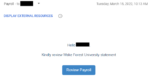
Recent Phishing Scam Imitating WFU Payroll
Beware of phishing notifications presumably coming from WFU payroll. Be sure to scrutinize message content, as well as the source, before responding to the sender or interacting with embedded links and/or attachments. This particular phishing scheme prompts users, who click the “Review Payroll” button, to download a malicious software package.
Recent phishing scams imitating financial institutions
Presently, there is a text phishing “smishing” campaign imitating financial institutions with alarming messages regarding account security issues. Be sure to scrutinize message content when opening texts, as well as the source before responding to the sender or interacting with embedded links and/or attachments. Following is an example of a recent fraudulent text message. It…

Phishing for your Credentials
Presently, there are several recurring phishing email campaigns directed at a number of WFU recipients with the purpose of harvesting account information, such as username/passwords. These phishing attempts are quite sophisticated so we want to raise awareness of what you should be looking for when opening your Inbox. Be sure to scrutinize message content, as…
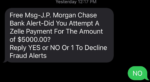
Bank Fraud SMS Phish Followed by Phone Phish
Be alert for fraudulent SMS messages asking users to confirm a payment, followed up by a phone call from the hackers mimicking the fraud department of that bank. When in doubt, hang up, look up the number of the organization supposedly calling you, and call back.
Do not become a phishing victim:
- Never provide your personal information in response to urgent emails, text messages or phone calls that instruct you to click a link to confirm your payment or enter more information
- View your Wake Forest email in the Gmail web interface or Gmail app on your mobile device to leverage warning banners across suspicious messages.
Learn more!
- Register for a Computer and Information Security Essentials Class
- Faculty and Staff – Learn more about KnowBe4, our cybersecurity and phishing training platform
- Students – Take the KnowBe4 Home Course and learn how to make wise decisions when it comes to Internet usage
- Visit Virus and Malware Removal Tools and Tips | AskDeac